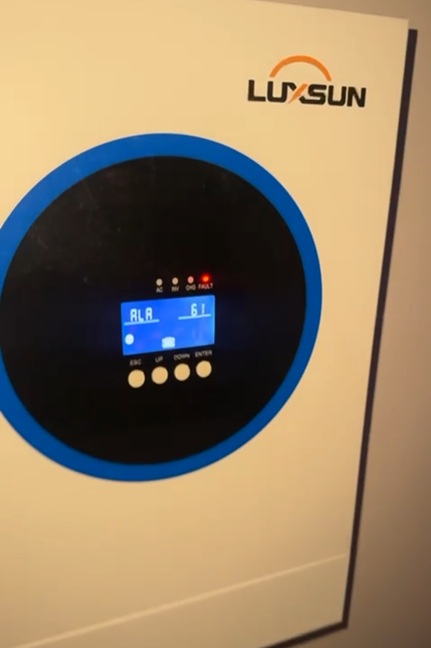
10 Common Causes of Inverter Beeping, Its Fault Codes & Troubleshooting Guide
Why is my inverter beeping? I was enjoying my day, watching TV on a hot sunny afternoon, when all of a sudden, the inverter started sounding an alarm. It’s a question no solar owner wants to ask. But do not worry, because in this article, we will walk you through the most common issues that trigger your inverter warning sounds and their accompanying error codes, and what you can do to solve and prevent them from happening again.

That "alarming noise" is actually your inverter’s way of calling your attention and talking to you. It was designed to protect not only your batteries, but also to keep your inverter and home safe.
Not all inverter beeps or alarm sounds the same, or refer to the same issue. From old model transformer-based inverters like the Luminous, Soccerpower, Victron Energy, Microtek, etc, to the modern solar hybrid transformerless-based inverters like Sako, Luxsun, Luxwatt, SMS, Felicity, Huawei (FusionSolar), Sungrow, Growatt, etc, the beeping pattern below refers to different categories of warning or faults:
- A single beep after every few seconds generally refers to normal notifications, such as mains on or off, battery mode, or low battery.
- A fast or continuous beeping generally refers to a critical warning, such as overload, overheating, etc.
- One long, solid sound is a sign of system failure (including a drained battery) as well as a short circuit.
Aside from serving as a pre-warning system, it also alerts you when the inverter detects certain faults before it causes a bigger damage.
So before you consider "turning it off and on again" or calling your installer or technician, we have prepared a list of the most common cause that triggers inverter sounds, so you can use this 10-step troubleshooting guide to identify and fix the issue.
1. Low Battery (F04)
This happens when the battery has drained to its low cut-off level. There are two types of alarms in this category. If the beep is short and sounds after a few seconds, then the inverter might be warning you that the battery voltage or level has gotten low.
If the sound is long and continuous, and the inverter shuts down, this might signal that the battery level has gotten to/or below the set cutoff level, and the inverter is essentially protecting the battery from permanent damage.
This will be accompanied by the low battery icon illuminated or the F04 error code showing up on the inverter screen.
Solution:
- Check the Battery State of Charge (SoC)
- Charge the batteries.
2. Inverter Overload ( F07)
This happens when the inverter is trying to carry loads that are beyond its capacity. It might beep briefly, then stop when heavy inductive loads are first put on due to the initial start-up current.
Or, it might continuously beep at intervals before entering a long continuous beep before shutting. This signifies that the overload is continuously overloaded and is trying to protect itself.
The overload icon will become illuminated for older model inverters, while modern inverters might show the F07 error code on the screen. A short circuit caused by faulty wiring or faulty appliances can also appear on the inverter as an overload.
Solution:
- Switch off the excess load.
- Remove the faulty appliance immediately if you can.
- Get a qualified technician to trace faulty wiring.
3. Short Circuit Detection (Error Code 17)
The inverter will enter a continuous long beep and shut down once it detects a short circuit or wiring fault where it is installed. A faulty appliance can also cause this, and the inverter breaker might trip off if it has one. The essence is to prevent further hazard.
A short circuit might also appear as an overload sign on the inverter.
Solution:
- Isolate the inverter from the home by putting the output breaker off and changing over to neutral. Put on the inverter. It is only expected to come on and not supply light to the home. If the inverter comes on normally, then the short circuit issue is from the wiring/appliances in the home. But if it still shows the short circuit or overload indicator, then the problem lies with the inverter itself
- Get a qualified technician to trace and rectify the cause.
4. High Battery Voltage (Overcharge) (Error 06 or Error 04)
When the voltage from the solar charge controller or grid is more than the battery's safety settings, the inverter can sense a high battery voltage and set off the beeping alarm. This is usually caused by a faulty solar charge controller or wrong charging settings.
Solution:
- Switch off the inverter and turn off both the solar input and grid input breaker.
- Get a technician.
5. Poor Or Unstable Power From The Grid
Aside from the usual alarm that goes off when power from the national grid (NEPA/PHCN) goes off or comes back, if the voltage is unstable or excessively high or too low, the inverter will always revert to battery mode and beep.
The inverter does this to protect itself and your appliances from damage and might let out the beeping sound whenever it changes mode.
Solution:
- You can change the inverter settings to accept a wider range of AC input volts if it is safe for your appliances.
- Install a stabilizer to normalize the current entering the AC input of your inverter.
6. Solar (PV) Input Overvoltage or Undervoltage (Error Fault Code F52 and 09)
Solar hybrid inverters might beep to alarm you if the total voltage coming from the solar panels is more than its maximum Voc (Open Circuit Voltage) or below its minimum requirement.
This is caused by a poorly planned solar panel configuration during installation. The F52 error code for low voltage (this code can also be triggered by low battery voltage) or a Fault Code 9 for PV overvoltage can appear on the inverter screen.
Solution:
- Switch off the solar input breaker and get a qualified technician.
7. Overheating & Fan Failure (OH, F01, 19, 20, P5, P6, P7)
The inverter might sound an alarm when its temperature goes beyond its safety limits while working. This can present itself as continuous beeping followed by a complete shutdown, and the inverter can display the F01 error code on the screen.
This is caused by dusty/blocked cooling fans and air vents, the inverter installed in an unventilated room that gets hot, obstruction on the path of air vents, which can be caused by placing the inverter's air vent close to a wall during installation, or outright failure of the fans themselves.
Solution:
- Switch off the inverter
- Switch off the grid AC input breaker and also the solar breaker.
- Ensure there is at least 15cm of space on both sides of the inverter for airflow.
- Call a technician.
8. Loose or Corroded Battery Terminals
This usually happens in tubular battery installations due to sulphurated or corroded battery terminals and connecting cables, especially when the inverter is trying to power high loads or simply turn on.
The corrosion creates high resistance and voltage sag (voltage drop), which the inverter senses and interprets as a low battery, and might even shut down, even though the battery is full.
Solution:
- Ensure the bolts and nuts on the battery terminals are tight
- Clean the battery terminals.
- Change the battery cables if they are corroded.
- Apply petroleum jelly to prevent corrosion.
- Do not overfill tubular batteries with distilled water.
9. Firmware or Software Glitches & Communication Error
As inverters become more advanced and computerized, software glitches can occur, such as a failed background update or a Battery Management System (BMS) communication error between the inverter and a lithium battery.
In the absence of a BMS error, this can present itself as a persistent beep that doesn't correspond to any physical fault.
Solution:
- A hard reset, which is switching off the input grid breaker, the solar PV breaker, and the battery breaker for 5 minutes, then switching them on in this order - battery, then solar, then grid, usually solves this.
- If the beeping continues, call your technician.
10. Internal Component Failure
An internal component of the inverter can go bad and trigger an alarm. Components such as capacitors, MOSFETs, or a transformer can blow due to a massive external power surge (lightning or grid spike) or simply reach their end of life from normal wear and tear from usage.
When this happens, the inverter can continually beep or emit a strange ringing alarm even when it is connected to a load or isolated.
Solution:
- Get a qualified technician.
While most modern inverters allow you to silence the notification beeps via the settings (usually labeled as "Alarm" or "Buzzer"). We recommend you do not do this, as lingering faults can result in much bigger problems that can spoil the inverter, permanently damage the battery, or even lead to a fire outbreak.
Related Articles
.png?alt=media&token=1c41250f-028b-4faa-84d3-6a3f77b1d837)
How to Fix Lithium Battery Communication Error Between BMS & Inverter (Fault 61, F58, Error 67, Warning 20)
When a solar system is working properly, the lithium battery's battery management system (BMS) and inverter work together like a coordinated team,...
%20Manual%2C%20Fault%20%26%20Fixes.png?alt=media&token=5b2b6e5b-fa65-4f78-b10f-58ee9ff240d2)
Victron Energy Phoenix VE.Direct Series Manual, Faults & Fixes
We analyzed the official Victron Phoenix VE.Direct PDF manual for the 250VA to 1200VA series, and have provided the basic datasheet, LED fault codes, ...
Causes Of Solar Panel Fires, Battery Explosions & Burning Inverters - Prevention & Safety Guide
There are cases of explosions and fire outbreaks due to solar power installations. Despite the exponentially number of solar installations (about 0.2 ...